Recovering Deleted/Lost/Missing Data From Novell Servers
ensure that the data recovery software you purchase can recover data from all these volume types
3.2 Case Study – Using Stellar Phoenix Novell to recover data
All data recovery software have a trial version available which lets users get a good approximation of how effective the software can be. The trial version scans the disk using both Standard and Advanced modes and displays a list of all recoverable data. However, the full version will be needed to actually restore/save that data.
If you have lost data to be recovered, try downloading Stellar Phoenix Novell from www.stellarinfo.com/netware-data-recovery.htm and then install the software to a healthy working hard disk with the Windows Operating System in it. Stellar Phoenix Novell is a win32 executable and needs to be installed to a Windows based disk.
Run setup.exe from among the downloaded files – the software is installed, by default, to a Stellar folder in Program Files. Additionally, usual entries to the Programs group (Start -> Programs) and the Add/Remove Programs list (in Control Panel) are also made.
Note: Make sure you are logged in as administrator before initializing setup - the software installation requires local administrative rights in Windows NT/2000/XP.
The affected server disk should be connected to this 'Windows' disk as a secondary (for details, read Section 2: Setting up the hardware).
Running the software will display the user interface containing a Toolbar which contains all necessary buttons to operate the software, from initiating the recovery process to saving the lost data.
Limitation of Stellar Phoenix Novell: NetWare 6.5 and later has an optional Encrypted Volume Support (EVS) feature using which it is possible to encrypt data stored on any newly created volume (the SYS volume is the only volume that cannot have the EVS feature in it). This is done mostly for protection of data against theft. Although data in EVS volumes are in an encrypted format, they work seamlessly with all applications. To learn how to create an encrypted volume, visit: http://www.novell.com/documentation/nw65/index.html?page=/documentation/nw65/nss_enu/data/bq2y6nb.htm.
Stellar Phoenix Novell cannot recover data from such encrypted volumes.
For further information on the workings of this software, read the product's Knowledge Base articles at: http://stellarinfo.com/esupport/users/kb.php?category_id=13
3.2.1. How to recover deleted files
NWFS
- Click the Select Physical Disk button (
 ) on the Toolbar to begin the recovery process. The software displays a list of all the hard disks it can detect, including the affected server disk. Select the server disk and then click OK to continue. ) on the Toolbar to begin the recovery process. The software displays a list of all the hard disks it can detect, including the affected server disk. Select the server disk and then click OK to continue.
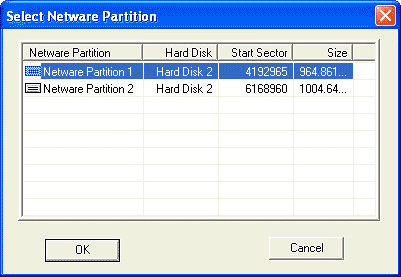
- Select the NetWare partition
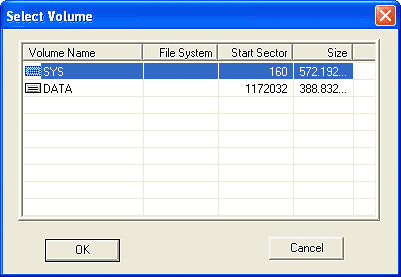
- Select the Volume
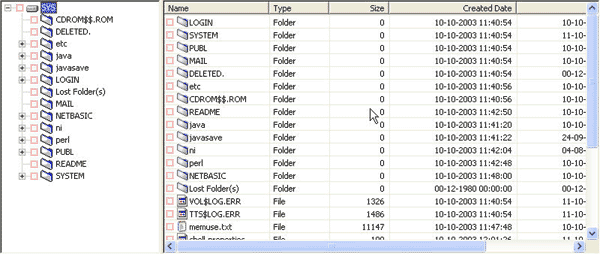
- The software looks for deleted entries in the selected volume and displays the result in a simple tree structure.
If the standard search fails to turn up the desired results, the software can be made to search in an advanced mode (read
|