Recovering Deleted/Lost/Missing Data From Novell Servers
After the jumper pins have been set and IDE cable connected at the correct points, the disks need to be installed into its case – simply screw in the disk to secure it to its case. The next step is to make sure that the computer accepts the disks.
2.3 Connecting SCSI Disks
While disks with IDE interfaces have gained popularity with home PC users because of their low cost, SCSI interface disks are common with servers and high performance workstations and/or peripherals. The most visible difference between IDE and SCSI disks is that a single SCSI adapter can handle as many as 7 or 15 devices at a time – because of this, setting the Jumper Pins at the back of a SCSI disk are a little more complicated than behind an IDE disk.
In connecting SCSI disks appropriate jumper pins have to be set to assign SCSI ID's, configure termination, etc. For data recovery purposes the only thing to remember while connecting the disks is to connect the SCSI disk with lost data as:
- 'Slave' on the Primary channel OR
- Either 'Master' or 'Slave' on a secondary channel
This implies that the disk with lost data can be connected in any way to a working disk, as long as the system does not boot from the affected disk.
This is similar to disks with IDE interfaces (see above – Connecting IDE disks - for connection details). The jumper pin setting information should be detailed in the sticker on the disk itself. After connecting the SCSI disk in the appropriate configuration, the next step is to make sure that the computer accepts the disks.
2.4 Finishing Up
The BIOS usually automatically detects new hardware - this is so because the disk detection feature is set to 'AUTO' by default. However, it is still better to enter the BIOS and confirm whether the appropriate disk channel(s) are set to 'AUTO'.
There are different methods of entering the BIOS for different motherboards. It is usually done by pressing the 'F2' key or the 'Delete' key just after starting the computer (To find out the exact keystroke(s) to enter the BIOS, visit: http://www.numonics.com/support/bios.htm).
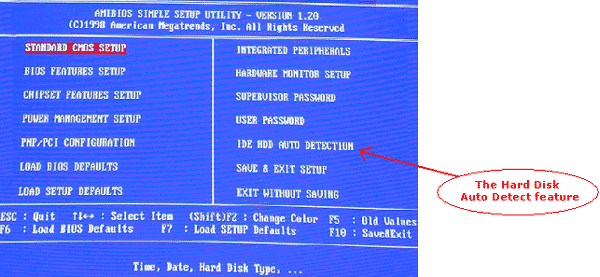
- In the BIOS, navigate through the main menu and go the Hard Disk AutoDetect feature
- In the Hard Disk setup window, make sure the channel that the disk is connected to, is set to 'AUTO'. For Example: If the disk with lost data is a 'slave' on the primary channel, make sure that this option is set to 'AUTO'.
- After making the necessary changes, remember to save changes before exiting BIOS.
3. Using Data Recovery Software (Stellar Phoenix Novell)
3.1 How data recovery software work
When a file is seemingly 'deleted' from a disk, the actual data is not removed. The only thing that is done is modification of the file's entry in the directory table/tree such that the space on the disk that the file occupied is now labeled as free space. Thus, the file still exists on the disk - but the file system is blind to it. This is much like a house without an address - it exists, but there is simply no way to go to it. Permanent deletion occurs only after the file's actual data is overwritten by other data. |